Adjust the settings of your Bluetooth
Bluetooth Settings for TV is a utility application developed by 4A. As the name suggests, this application allows you to adjust the discoverability and pairing of your device's Bluetooth. With this, you don't have to manually adjust the settings from their TV.
Top Recommended Alternative

Bluetooth Settings for TV comes with a simple interface. Not only that but as per the description, the changes you made are applied instantly. However, most of the time, the app fails to connect your device to your TV or other Bluetooth devices. If it does, it will pair with just about any device within your range.
What can the app do?
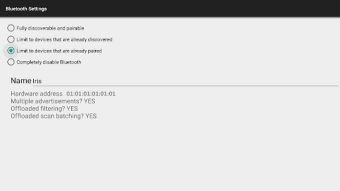
Bluetooth Settings for TV offers a convenient way for you to adjust the settings of your device's Bluetooth. Upon launching, you will be greeted by a simple interface. Everything that the app offers is in one tab, making it easy to make adjustments. Not only that, but it only requires you to tick off the option you want to apply. According to the app, all changes will take effect immediately.
However, the options that you can enjoy are rather limited. You can either make your device fully discoverable and pairable or limit it to the devices you have already discovered. You can also limit it to the devices you have already paired. Finally, you can also fully disable your Bluetooth. Users must also note that there is no option to enable your Bluetooth from this app.
More than the limited adjustment options, the app also suffers from technical issues. The biggest of which is its inability to work reliably. The app often fails to connect your phone to any Bluetooth device. And if it does, it often receives constant notifications from other devices. Moreover, the settings revert to their default every time you close the app. With this, you need to reapply them.
Should you download it?
All in all, Bluetooth Settings for TV should have been a handy tool if you constantly use Bluetooth devices. The app allows you to customize the discoverability and pairing of your Bluetooth with ease. However, while it does the job, its performance is not that reliable. Moreover, its options are too limited, and some of them are already offered on your native Bluetooth app.


.png)